Henry Carrasco

Remote Agent

A Windows desktop agent that any authorized web page can ask to do things on the user’s machine.

Year
2026
My role
Protocol design and full development
Team
solo
Sector
Internal tooling and remote support
  • C#
  • .NET
  • SignalR
  • Windows
  • Dependency injection
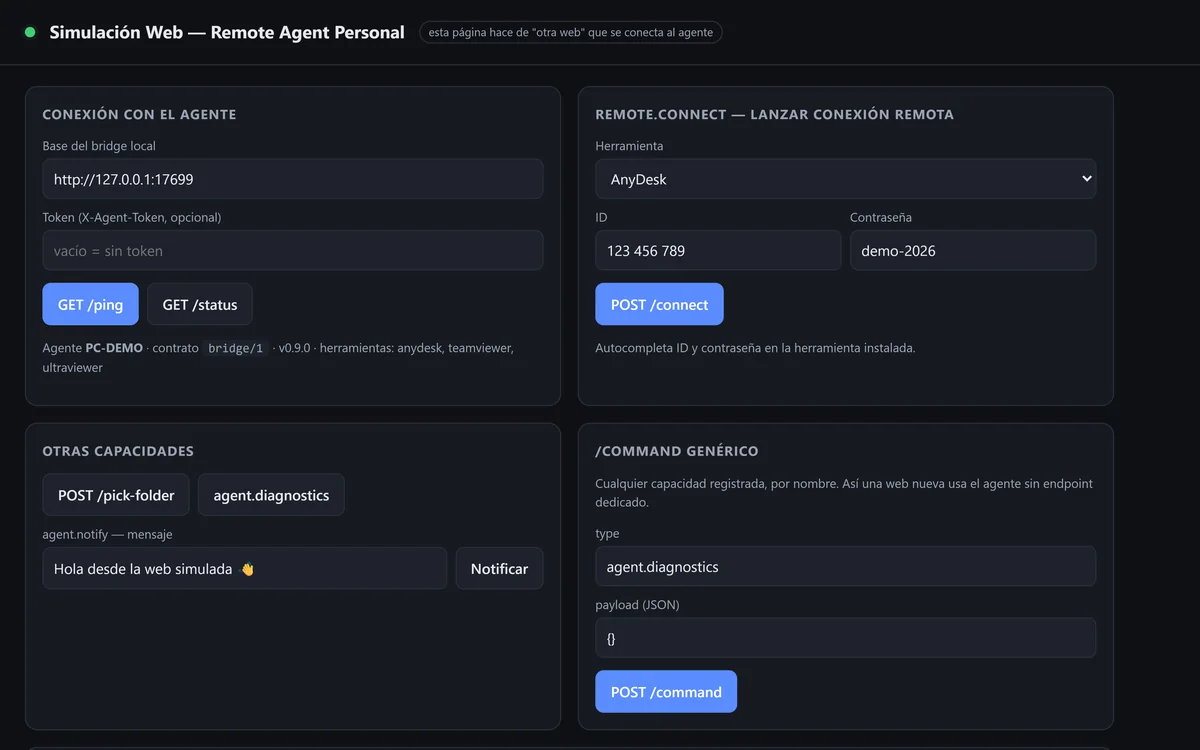
The simulation page calling the agent’s local bridge: connection base, remote connection, other capabilities and the generic command

The problem

What was wrong

A web page cannot touch the machine it is being viewed on: it cannot launch a local program, open the system folder picker or know what is installed. Everything that crosses that boundary ends up being done by hand and over the phone — reading out an AnyDesk ID, walking the user to the right window, and repeating it with the next one. The browser knew exactly which machine it wanted to reach; what it lacked was a door.

The constraints

  • Browsers only let a page reach loopback under strict conditions, and the response has to carry the right header or the failure is invisible from the web side.
  • It has to work in both directions: the web calling the agent while the user is there, and a server sending work when they are not.
  • It cannot depend on the ERP it grew out of: this version points wherever configuration tells it to, with no URLs or secrets from any particular system.
  • The domain logic has to be testable without a Windows machine in front of you, or every change needs real hardware to verify.

What I built

The solution

  • A local HTTP bridge on 127.0.0.1, hand-written over TcpListener, with origin allow-listing and an optional token: the door through which an authorized page talks to the agent.
  • A capability pattern — one class is one action, with a single registry — that the local bridge and the remote channel dispatch identically.
  • The generic capabilities: remote connection for AnyDesk, TeamViewer and UltraViewer (the last one through Win32 automation of its window), folder picker, machine diagnostics and system notifications.
  • An outbound SignalR channel to any configurable hub, where the connection itself is the presence: there are no heartbeats and no state table to fall out of sync.
  • A tray icon with a menu and notifications, single instance, Generic Host with dependency injection and configuration through a file or environment variables.
  • A complete simulation included — a test web page and a hub — exercising both directions without depending on anything external.

Seeing it work

Screenshots

How I did it

My part and my decisions

Separating what I designed from what I implemented does not take anything away: it is what lets you tell whether I can carry a design or only execute one.

01

What was mine

What I designed

The contract between the web and the desktop: the capability pattern with its single registry, the split into three projects with the domain ports — process launcher, folder picker, system information — defined in the core and implemented in the Windows layer, and the decision that both transports dispatch against the same registry.

What I implemented

The three projects in the solution: Core on plain net8.0 with no Windows dependencies, Capabilities with the operating-system specifics including the Win32 interop, and App with the hosting, the bridge, the channel and the tray. 47 C# files, around 2,500 lines, plus the simulation it is verified against.

Who I worked with

A personal project. It grew out of an agent I built at work, and this version is a decoupled rewrite: out went the ties to the ERP, the inventory and every URL and secret from that site; in stayed only the generic part, pointing wherever configuration says. What is shown here is the design, not the system it came from.

What I learned here

To genuinely separate the domain from the operating system: the core defines the ports and Windows implements them, so the logic can be tested without touching a real machine. Also SignalR as a bidirectional channel, and Win32 interop over someone else’s windows, which is considerably less tidy than the documentation suggests.

02

Technical decisions

The bridge, hand-written over TcpListener

The obvious alternative was to host Kestrel inside the tray application. I ruled out dragging in the full web host — and its startup, and its surface — to serve five loopback routes: a few hundred lines do the same and keep the executable small and the startup instant. The trade-off is that the routing and parsing are mine, and so are their bugs.

One class per capability, not one endpoint per action

With dedicated endpoints, every new action touched the bridge, the channel and both contracts. With a single registry and a generic POST, adding an action is one class and one registration line, and it becomes available over the local bridge and the remote channel at once. It is the decision that has saved the most work since.

What I would do differently: the fixed port

The port is pinned in configuration, which forces a manual change when two agents live on the same machine. Today I would negotiate the port within a range and publish which one it landed on, so the web can discover it instead of being told.

03

What broke, and how I fixed it

The origin that was not a URL

Opening the test page as a local file, every call to the agent failed with a CORS error even though the bridge answered correctly with a 200. The agent was fine: browsers send the literal string “null” as the origin when a page comes from `file://`, and my allow-list compared against URLs. It cost an afternoon because the symptom accused the wrong side. The simulation is now served over HTTP, which is how it will actually be used, and the list handles the case.

How it holds up

Security, errors, performance and maintainability

What keeps a system standing after it is written. Where I have not measured it, I say so.

Security
The door only listens on loopback, never on a network interface: from outside the machine it does not exist. On top of that, an origin allow-list and an optional token, because any page open in that browser can try to call it. The remote channel is outbound: the agent decides who it connects to and opens nothing inbound.
Errors
Every capability returns a result with its own code, and the bridge translates to HTTP in one place instead of scattering error handling across actions. What cannot be done is answered by saying so, which is what lets the web tell “not installed” apart from “it failed”.
Performance
This is not a performance problem: they are one-off calls triggered by a person. What does matter is startup, which is why there is no web host inside; the agent is ready as soon as the tray icon appears.
Maintainability
A new action is one class and one registration line, without touching the bridge, the channel or the contracts. The core does not reference Windows, so the logic is testable on any machine. The bundled simulation makes it possible to verify both directions without setting anything up.

Outcome

What changed

It builds and runs on its own, verified end to end against the simulation in both directions: the web calls the agent over loopback, and the agent serves commands from a remote hub and reports the result back. Adding a new action costs one class and one line, and it is exposed over both paths without touching anything else.